 EchoFill
Fill any form once.
EchoFill does it from then on.
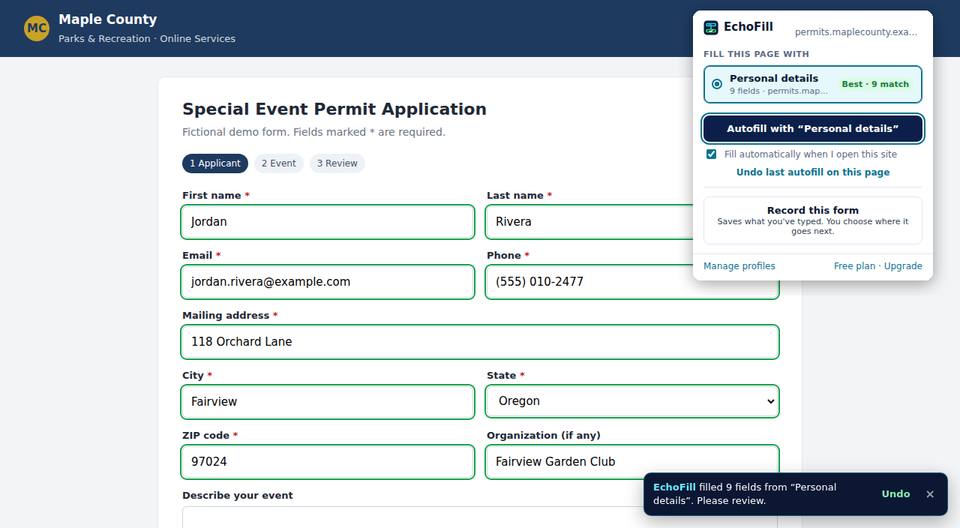
EchoFill remembers what you type into web forms and fills it back in the next time you open the page, automatically or with one click. Government portals, listings, applications, checkout: if you fill it more than once, stop retyping.
How it works
No setup, no rules to write. You teach EchoFill by doing what you already do.
Fill a form once
Type your answers the normal way on any website.
Click Record
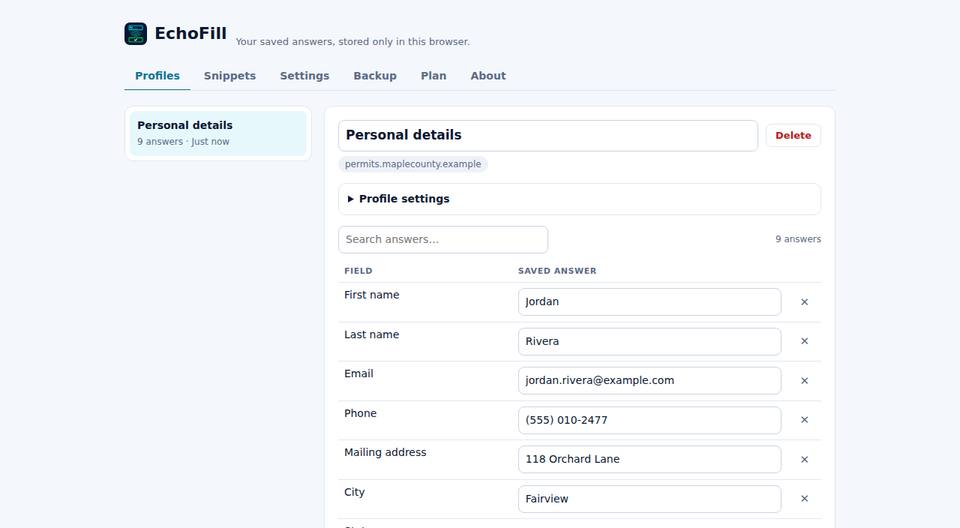
Open EchoFill and save your answers as a profile. You choose whether it's new or updates one you have.
Next time, it's done
Open the page and EchoFill fills it for you. Review, then submit. Undo is one click away.
For every form you fill more than once
EchoFill works on modern websites, including multi-page forms and the custom dropdowns many sites use.
Your answers never leave your device
No account, no cloud, no tracking. EchoFill asks permission one site at a time, never for "all websites".
- Stored only in your browser. Export or delete any time.
- Never records passwords, card numbers or Social Security numbers.
- Fills empty fields only, so it never overwrites what you typed.
- Undo any fill, and restore earlier versions of your profiles.
Simple pricing. Free really means free.
Fills are never limited, metered or queued, on any plan.
Free
- Unlimited fills, manual and automatic
- Up to 3 profiles
- Multi-page forms and custom dropdowns
- Undo, restore points, backup and spreadsheet export
Pro
- Unlimited profiles
- Universal fields: fills forms on sites you've never recorded
- Snippets and date variables
- Custom field targeting for stubborn forms
Free EchoFill fills the forms you've recorded. Pro also understands what a field is asking for, so a site you've never visited fills too.
Jordan
Jordan ✓
Payments are processed securely by Stripe via ExtensionPay. 14-day refund, no questions asked. See terms.
Questions
Does EchoFill work on sites I haven't recorded?
Automatic filling works on sites you've recorded and approved. With Pro, clicking Autofill on a new site also fills fields by meaning (Universal fields), for example "Given name" gets your first name.
What about forms with several pages?
Record the first page. On sites with automatic filling on, EchoFill saves the answers you type on later pages as you go, so next time every page fills. It never changes an answer you already saved.
Can it overwrite something I typed?
No. By default EchoFill only fills empty fields, and every fill can be undone with one click. You can turn on overwriting per profile if you want it.
Where is my data stored?
Only in your browser on your device. There's no EchoFill account or server holding your answers. You can export a backup (JSON or spreadsheet) at any time.
Does it work in Microsoft Edge?
Yes. EchoFill runs in Chrome and in Chromium-based browsers like Edge.
I bought Pro. How do I use it on another computer?
Install EchoFill, open Settings → Plan, and click "I already paid". Confirm the email you paid with.